Lodestar Production Environment
Background
Production nodes are separated and managed in a different lodestar-ansible-production repository. The production repository is managed from the prod folder and includes our Lido fleet infrastructure.
The repo is linked as a submodule to lodestar-ansible-development. The submodule and symlink help prevent writing ansible roles twice, common directories are linked within the submodule.
Lido Fleet
The production environment includes our Lido validator fleet management:
- Lido Mainnet Nodes: Production validator nodes for Lido
- Lido Validator Ejector: Automated validator exit services
- Production Infrastructure: Beacon nodes, validator nodes, and supporting services for Lido operations
Architecture
TODO: update this image The Production nodes/servers consist of multiple Beacon servers, Validator servers, and one shared Metric server.
Each validator node has a corresponding beacon node. There are also Additional beacon nodes that serve as fallback or rescue nodes.
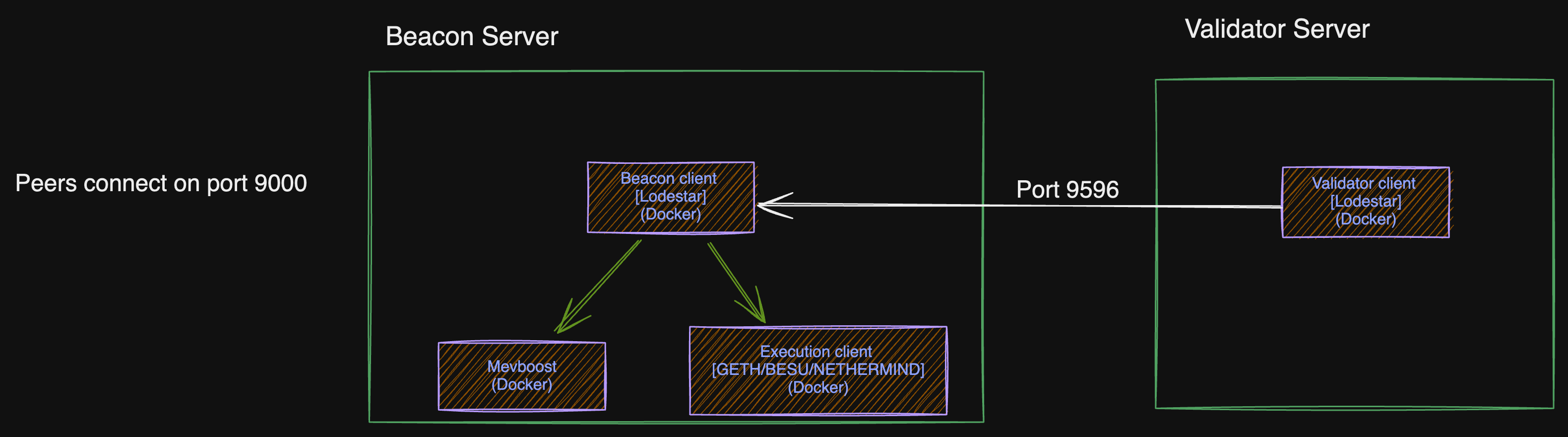
Beacon Servers
Beacon servers run:
- Beacon container: beacon lodestar client (Lighthouse very rarely).
- Execution container: Geth, Besu, Netheremind or Reth client.
- Mevboost container: for relays
- Nginx container: To expose metrics with basic auth enabled.
Beacon nodes are resource-intensive. This is because the beacon clients on mainnet needs about 200GB, and execution clients need about 1TB of storage.
Hetzner's AX41-NVMe bare metal server have 500GB of storage (Raid 1). We then add 2TB NVMe SSD to each beacon node server. The additional 2TB drive is mounted on /data to store the execution client's data, while the beacon and other containers use the main drive mounted on "/" path.
The docker containers use a host type network i.e. container ports are automatically mapped to host ports.
N.B: As a DR strategy, an additional backup/rescue beacon node is always running on Hetzner, and another on OVH.
Validator Servers
Validator servers run:
- Validator container: validator lodestar client.
- Nginx container: To expose metrics with basic auth enabled.
Validator nodes are less resource-intensive. They currently run on AWS t3.small. Validator keys are currently located in the ~/keystores directory.
N.B: Validator keys are extremely delicate. The same key should never be run concurrently on different processes to avoid slashing. The validator client automatically generates <validator key json>.lock file to prevent multiple runs of the same key, but extra care must also be observed by the operator.
Updating the Nodes
Updating Production Lido nodes can be done via automation, using the following GitHub workflows.
- Lido Prod Hosts Update: Used to update the Lido mainnet nodes.
- CIP Prod Hosts Update: Used to update the CIP production nodes.
- Holesky Prod Hosts Update: Used to update the Holesky production nodes.
The Update process
Follow the steps below to perform an Execution client or Consensus client update.
Use the checklist below as a guide, to update the lodestar version running on validator and beacon nodes.
- Silence production alerts on Pagerduty.
- Create PR with the container image update.
-
lodestar_dockerhub_tag=<image tag>for lodestar version update. -
geth_dockerhub_tagfor geth version update.
-
- Get PR approved and merged.
- Verify functionality of rescue node (check logs).
- Check the Kiln dashboard to ensure no block proposals are scheduled for the next 2 epochs.
- Start the Github action workflow.
- Upgrade rescue beacon nodes:
- The rescue-beacon-job starts in a DRY-RUN mode, confirm the changes in the logs and respond on the opened issues to either proceed or abort.
- Wait for the Rescue beacon nodes to be fully synced, and confirm they are healthy with good logs before proceeding.
- Validator upgrade mode:
- validator-upgrade-mode-job starts in a DRY-RUN mode, confirm the changes in the logs and respond on the opened issues to either proceed or abort.
- After the
validator-upgrade-jobis completed, confirm the validators are attesting via the rescue node.
- Upgrade beacon nodes:
- The beacon-job starts in a DRY-RUN mode, confirm the changes in the logs and respond on the opened issues to either proceed or abort.
- Wait for the beacon nodes to be fully synced, and confirm they are healthy with good logs.
- Upgrade validators nodes:
- The validator-job starts in a DRY-RUN mode, confirm the changes in the logs and respond on the opened issues to either proceed or abort.
- Restore production alerts on Pagerduty.